whid

What happens if you charge your phone overnight?

Your phone will not overcharge, but hours at 100% and heat slowly wear the battery. What happens through the night, which settings fix it on iPhone, Samsung and Pixel, and when it matters.

Illustration of a smartphone plugged in overnight with a moon and a charging bolt
Illustration: whid
Damage scale 1/5 Harmless
How fastMonths to years
Can you undo it?No, wear is permanent
Typical costEarlier battery replacement

The short answer

It will not overcharge, but it can age the battery slightly faster. Phones stop charging at 100% and top up as the level dips. What wears a lithium-ion battery is time spent full and heat. Features like Optimized Battery Charging on iPhone, Adaptive Charging on Pixel and battery protection on Samsung hold the charge around 80% for most of the night and finish just before you wake. Turn those on, keep the phone off your pillow and overnight charging is fine.

On this page 13 sections
  1. Step by step
  2. Your phone does not keep pushing power in
  3. What actually wears a battery
  4. The settings that solve it
  5. Heat is the bigger enemy
  6. What about tablets, laptops and earbuds?
  7. How long a battery lasts anyway
  8. The bottom line
  9. Overnight charging settings by phone
  10. What to do now
  11. Myth vs fact
  12. Reader stories
  13. Quick questions

01 What happens, step by step

  1. 0–1 hour

    Fast charge to around 80%

    Most of the energy goes in early, at the highest speed.

  2. Hours 1–6

    Held at 80% or at full

    With optimized charging the phone waits at about 80%. Without it, it sits at 100%.

  3. Before you wake

    Final top-up

    Adaptive features finish charging shortly before your usual unplug time.

  4. Years

    Gradual capacity loss

    Heat and time at 100% speed up the normal aging of the battery.

For years the advice was strict: unplug your phone when it hits 100%, never leave it charging overnight, let it run down before you charge it again. Most of that came from older battery types and older chargers. Modern phones handle overnight charging far better than the advice suggests, but there is still a small cost, and it comes from two things you can control.

Your phone does not keep pushing power in

Every smartphone has a battery management system that controls charging. Charging is fast at first, slows down as the battery fills, and stops when it reaches full. After that, the phone runs mostly from the charger and lets the battery dip slightly before topping it up again. There is no overcharging in the old sense, where current keeps flowing into a full battery.
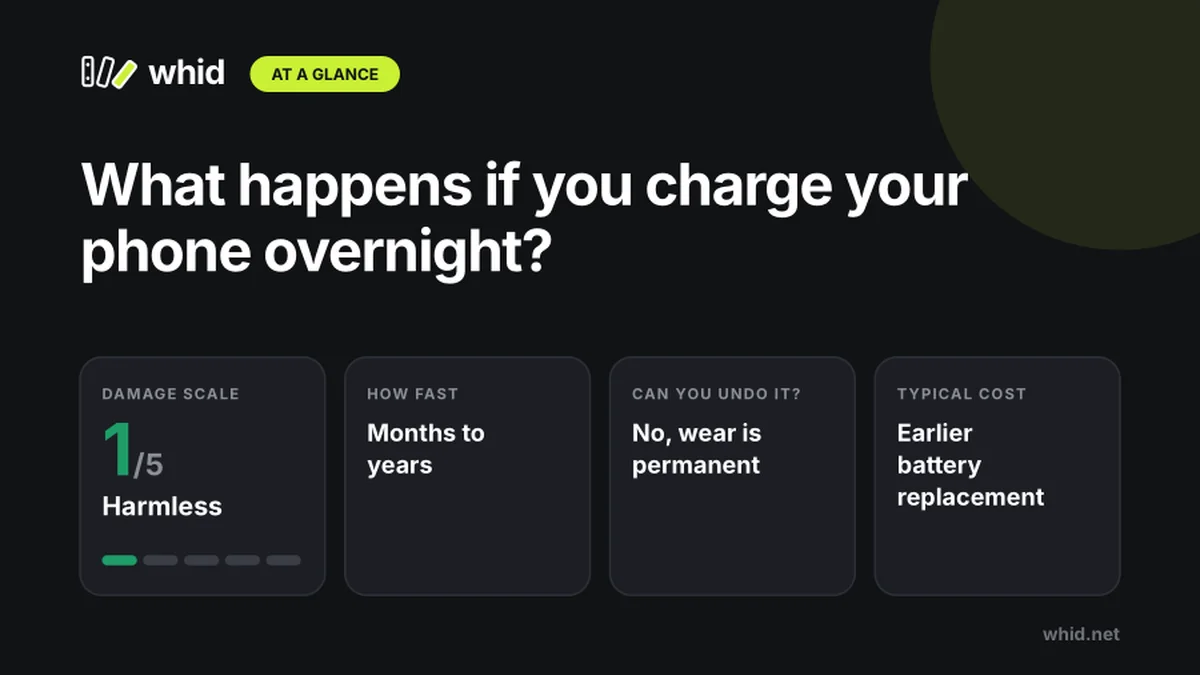
At a glance: What happens if you charge your phone overnight? Damage scale 1/5 (Harmless); how fast: Months to years; typical cost: Earlier battery replacement.
At a glance: the damage rating, how fast it happens, whether it can be undone and what it usually costs.

That is also why overnight charging is not a fire risk in itself with a decent charger and cable. Problems with heat and fire are linked mostly to damaged batteries and cheap, uncertified chargers, not to how long a phone stays plugged in.

What actually wears a battery

Lithium-ion batteries age a little every day whatever you do. Two things speed that up. The first is being held at a high state of charge: a battery sitting at 100% for hours is under more stress than one sitting at 50% or 80%. The second is heat. Apple says its devices work best between 32°F and 95°F (0°C to 35°C) and that charging in higher temperatures can permanently reduce battery capacity.

A phone charging overnight without any protection can easily spend six hours or more at 100%. Do that every night for two years and the battery will usually hold noticeably less than if it had spent those hours at 80%. It is not dramatic, but it is real.
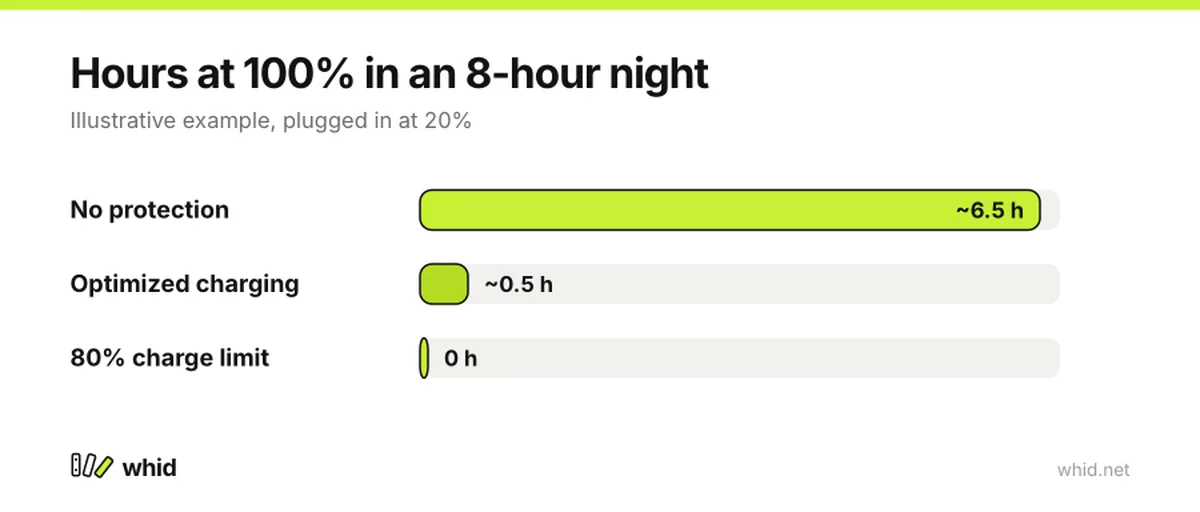
Bar chart: without protection a phone may sit at 100% for about 6.5 hours overnight, with optimized charging about half an hour, and with an 80% limit not at all
Our illustration. Actual times depend on the phone and charger.
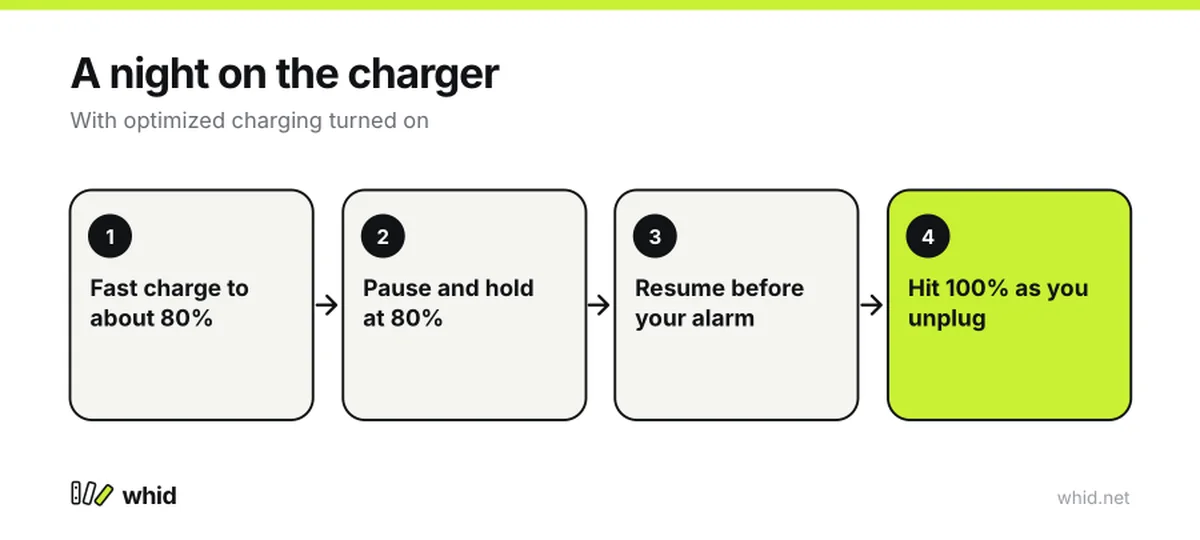
Four steps of optimized overnight charging: fast to 80%, hold, resume before the alarm, reach 100% at unplug
The goal is less time sitting at 100%.

The settings that solve it

Phone makers know people charge overnight, so they built features around it. On iPhone, Optimized Battery Charging learns your routine and holds the charge at about 80% until shortly before you usually unplug. iPhone 15 and later models also let you set a hard charging limit between 80% and 100% in 5% steps. On Google Pixel phones, Adaptive Charging does the same kind of scheduling, and newer models can limit charging to 80%. Samsung Galaxy phones offer battery protection modes that can cap charging at a set level, such as 85%, or adapt to your sleep schedule.

These features need a few days to learn your habits. If your alarm time changes a lot, a fixed 80% or 85% limit is more predictable than adaptive charging, which may otherwise stop at 80% and stay there.

Heat is the bigger enemy

Where the phone sits matters more than how long it is plugged in. Charging under a pillow or blanket traps heat. So does a thick case, a sunny windowsill or a hot car. Wireless chargers also tend to run warmer than cables, especially if the phone is slightly misaligned on the pad. Using the phone for gaming or video while it charges adds heat too.

A simple rule: charge on a hard, open surface in a room that feels comfortable to you. If the phone feels hot to the touch while charging, take it out of its case or move it.

What about tablets, laptops and earbuds?

The same chemistry applies to almost every rechargeable gadget, so the same habits help. Many laptops now include a battery health or charge-limit setting that holds the battery near 80% when it stays plugged in at a desk all day, which is exactly the situation that wears a laptop battery fastest. MacBooks use a similar optimized charging feature to the iPhone.

Wireless earbuds and smartwatches charge in small cases and docks that also stop at full. Their batteries are tiny, so heat is again the main thing to avoid: do not leave the charging case on a sunny dashboard or a radiator. For devices you store for months, like a spare tablet, aim to leave them around half charged rather than full or empty, and top them up every few months.
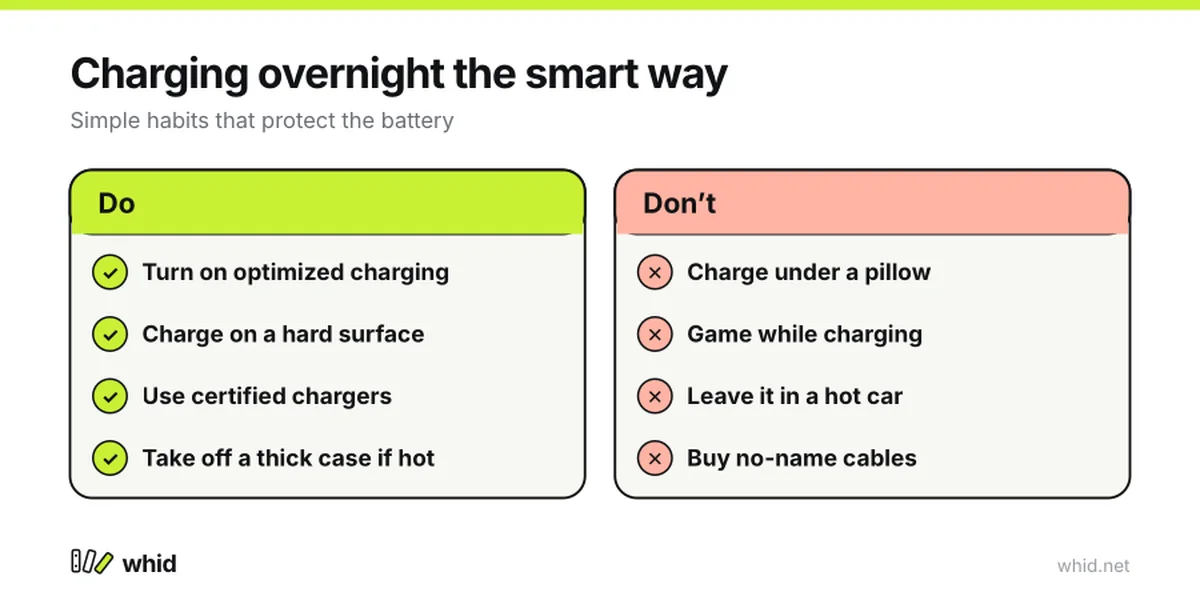
Do and don't list for charging a phone overnight
Heat matters more than hours.

How long a battery lasts anyway

Batteries are consumable parts. Apple designs iPhone batteries to keep 80% of their original capacity after a set number of full charge cycles, 1,000 cycles for iPhone 15 models and later according to Apple, and 500 for many earlier models. Most people reach that point somewhere between two and four years. Good overnight habits push that date further out rather than preventing it.

You can check battery health on iPhone under Settings, Battery, and on many Android phones in the battery or device care settings. When capacity drops low enough that the phone does not last the day, a battery replacement costs far less than a new phone.

The bottom line

Charging overnight is fine. Turn on your phone's optimized or limited charging, keep it cool and uncovered, and use a reputable charger. If you only top up during the day and never charge overnight, that is fine too. The battery cares about heat and long hours at 100%, not about the clock.
02 Overnight charging settings by phone

Menu names change between software versions.

PhoneFeatureWhat it doesWhere to find it
iPhoneOptimized Battery ChargingHolds near 80% until you usually unplugSettings > Battery
iPhone 15 and laterCharging limitCaps charge at 80%–100% in 5% stepsSettings > Battery > Charging
Google PixelAdaptive Charging / Limit to 80%Schedules or caps the chargeSettings > Battery
Samsung GalaxyBattery protectionCaps charge or adapts to sleepSettings > Battery

03 What to do right now

  1. Turn on optimized charging It is the single biggest improvement for overnight charging.
  2. Keep it uncovered Never charge under a pillow or blanket. Hard, open surfaces are best.
  3. Use certified chargers Cheap, uncertified chargers are the real fire and damage risk.
  4. Check battery health yearly Replace the battery when it no longer gets you through the day.

04 Myth vs fact

Myth Phones overcharge if left plugged in.

Fact Charging stops at full; the phone only tops up small dips.

Myth You should drain the battery to 0% before charging.

Fact Deep discharges add stress. Lithium-ion prefers partial charges.

Myth Overnight charging is the main thing that kills batteries.

Fact Heat does more damage than hours on the charger.

05 Has this happened to you?

Real experiences from readers. Stories are checked by an editor before they appear and are not professional advice.

No reader stories yet — be the first to share yours.

Share what happened to you

By sending, you agree that we may publish your story (first name and location only). See our privacy policy.

06 Quick questions

Is it bad to charge your phone overnight?

Not with optimized or limited charging turned on. Without it, hours at 100% age the battery slightly faster.

Should I keep my phone at 80%?

Keeping it around 80% for long periods reduces wear. Built-in features do this automatically.

Is wireless charging worse for the battery?

It tends to run warmer, so placement and ventilation matter more.

Can charging overnight start a fire?

It is very unlikely with a certified charger and an undamaged battery.

Sources

  1. Apple Support – About Optimized Battery Charging on iPhone
  2. Apple – Batteries: maximizing performance
  3. The Conversation – Should you charge your phone overnight?
  4. Tom's Guide – Does charging overnight damage your phone battery?

General information only. Laws, prices and procedures vary by location and change over time — check with a qualified professional for your situation. Full disclaimer.